AI resume screening · for Windows

Screen 100 resumes in minutes — on your own machine.

Drop in a job description and a folder of resumes. Get ranked candidates, skill-match breakdowns, and a hiring shortlist — powered by AI that runs locally, so applicant data never leaves your computer.

Runs 100% offline No data leaves your PC No account required
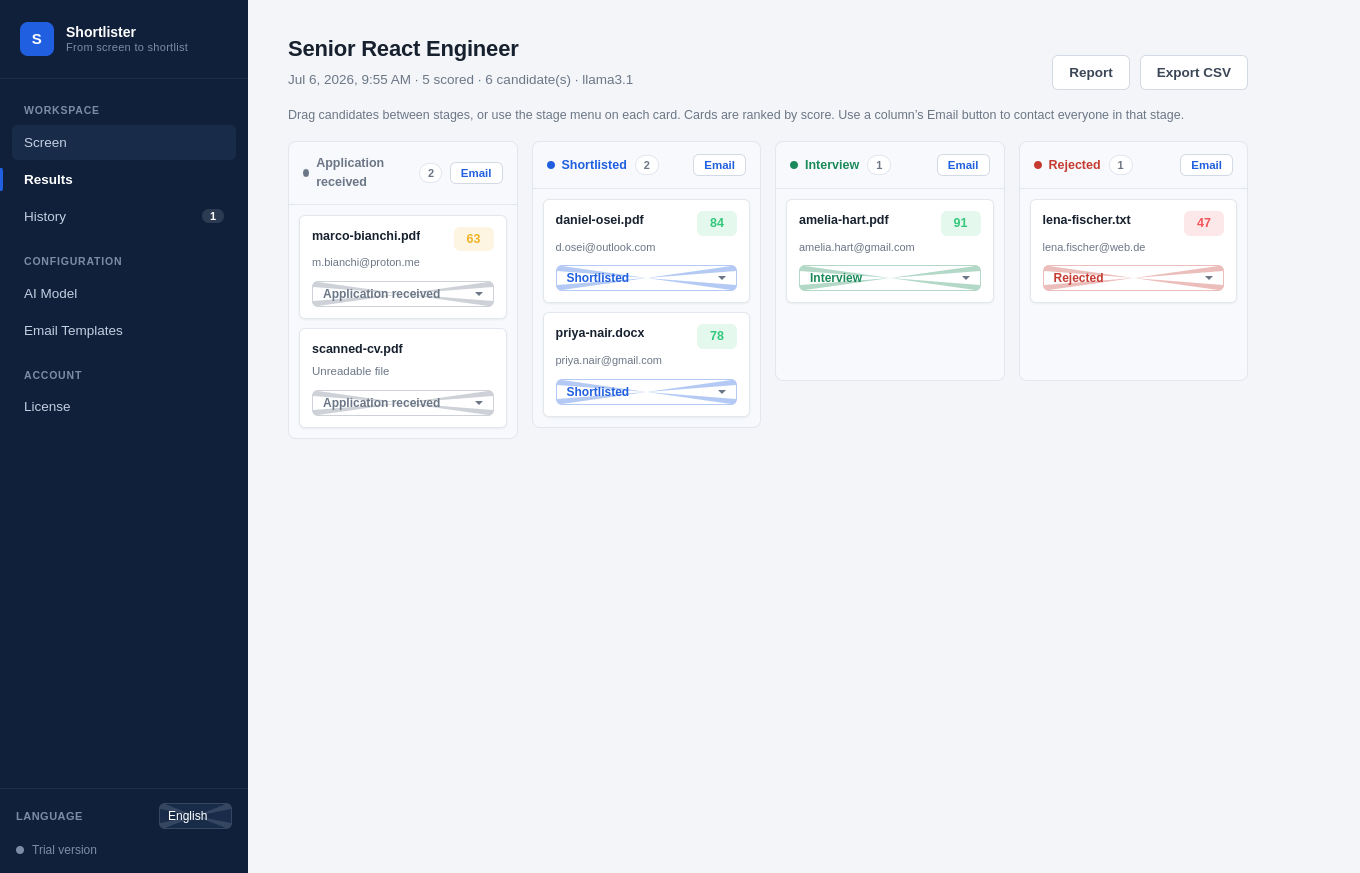
Shortlister — candidate pipeline board with ranked candidates
~100resumes per batch
PDF · DOCX · TXTformats parsed
Local or Claudeyour choice of model
0candidate data sent to us
See it in action

From job description to shortlist

A 20-second look at a full screening — scoring, ranking, shortlisting, and reporting.

LIVE DEMO
Pipeline board
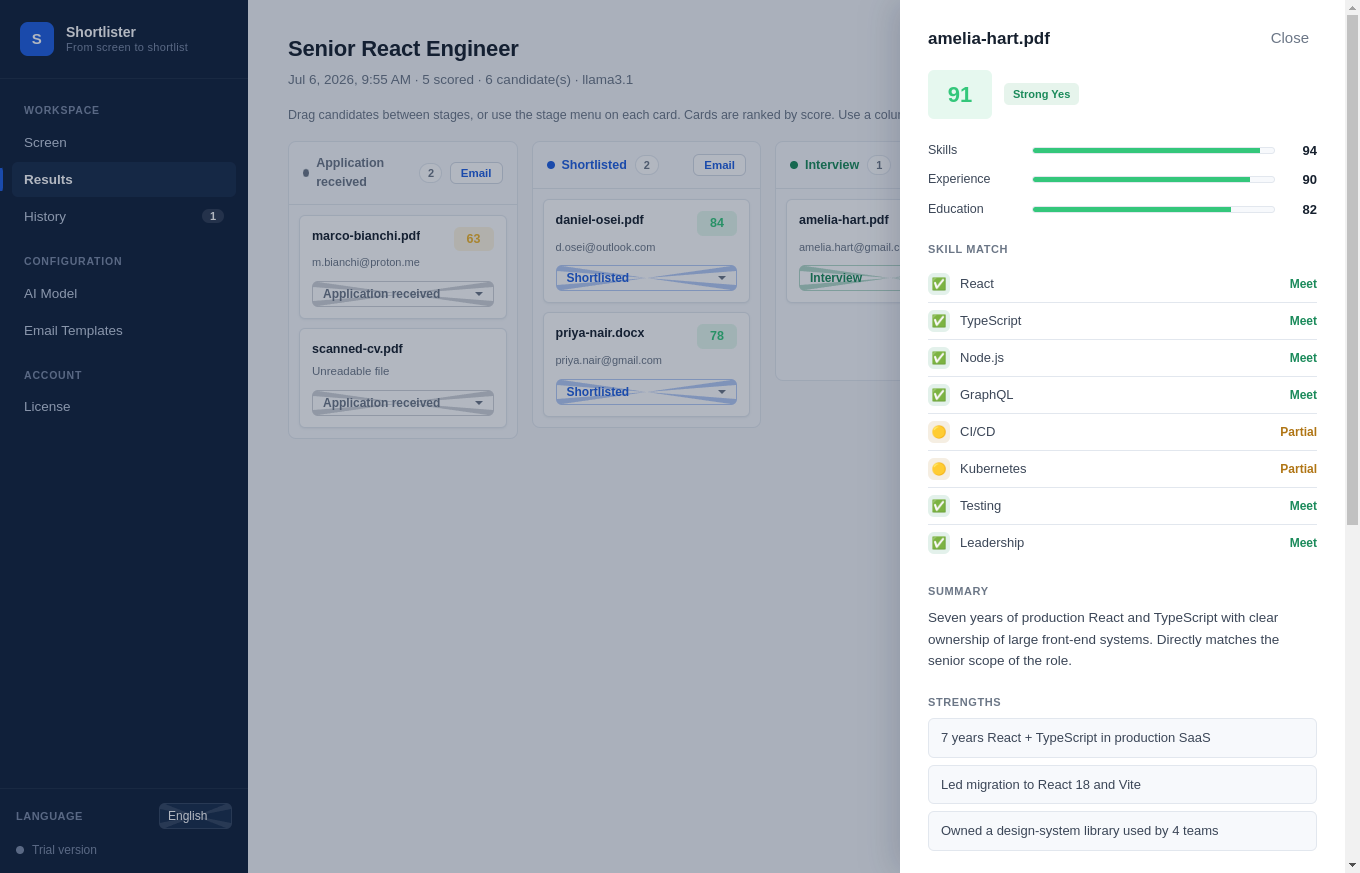
Candidate scorecard
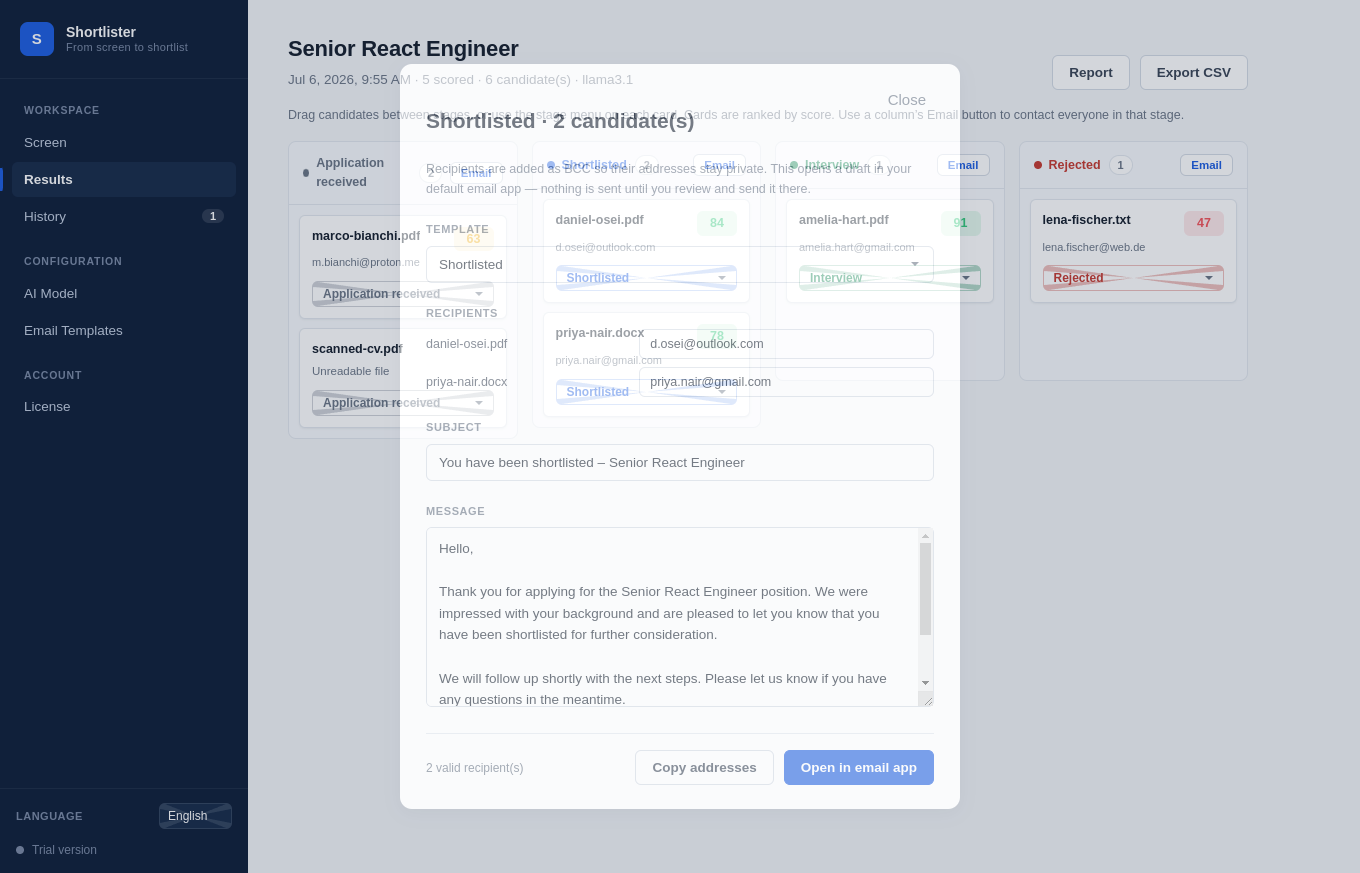
Email compose
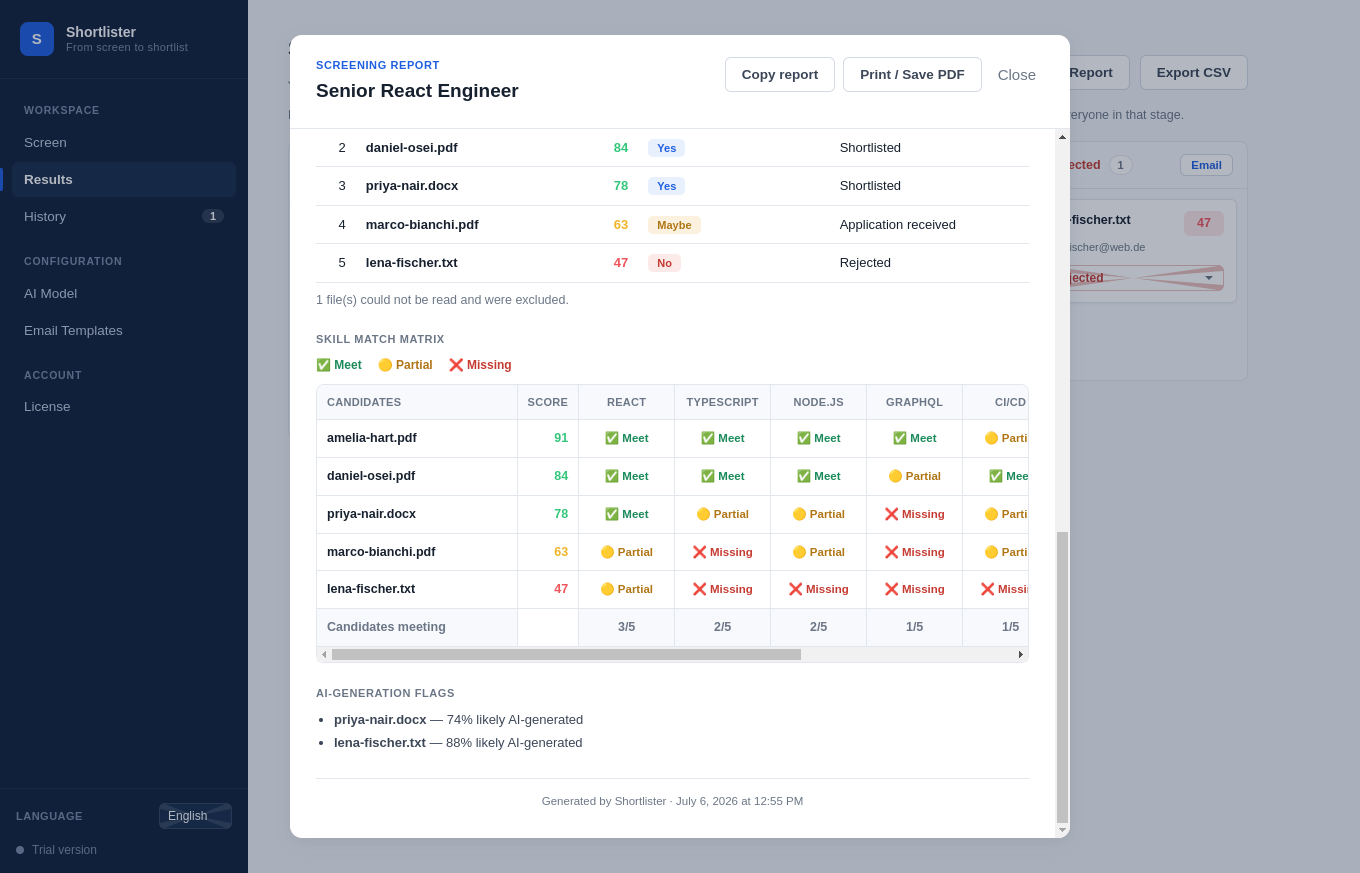
Skill match matrix report
1 · AI ranks candidates on the pipeline board
Everything you need to shortlist

From a pile of resumes to a ranked shortlist

Purpose-built for recruiters and HR teams who screen at volume.

1

AI scoring & ranking

Every resume gets an overall score plus skills, experience, and education subscores — with strengths, gaps, and a hire recommendation.

2

Per-skill match matrix

The job's key skills are pulled automatically, then each candidate is graded Meet / Partial / Missing — so you see exactly why they scored what they did.

3

AI-generation check

Get an estimated likelihood that a resume was written by a generative model, with the stylistic signals behind it.

4

Hiring pipeline board

Drag candidates through Applied → Shortlisted → Interview → Rejected. Every stage is saved with the screening.

5

Bulk email & templates

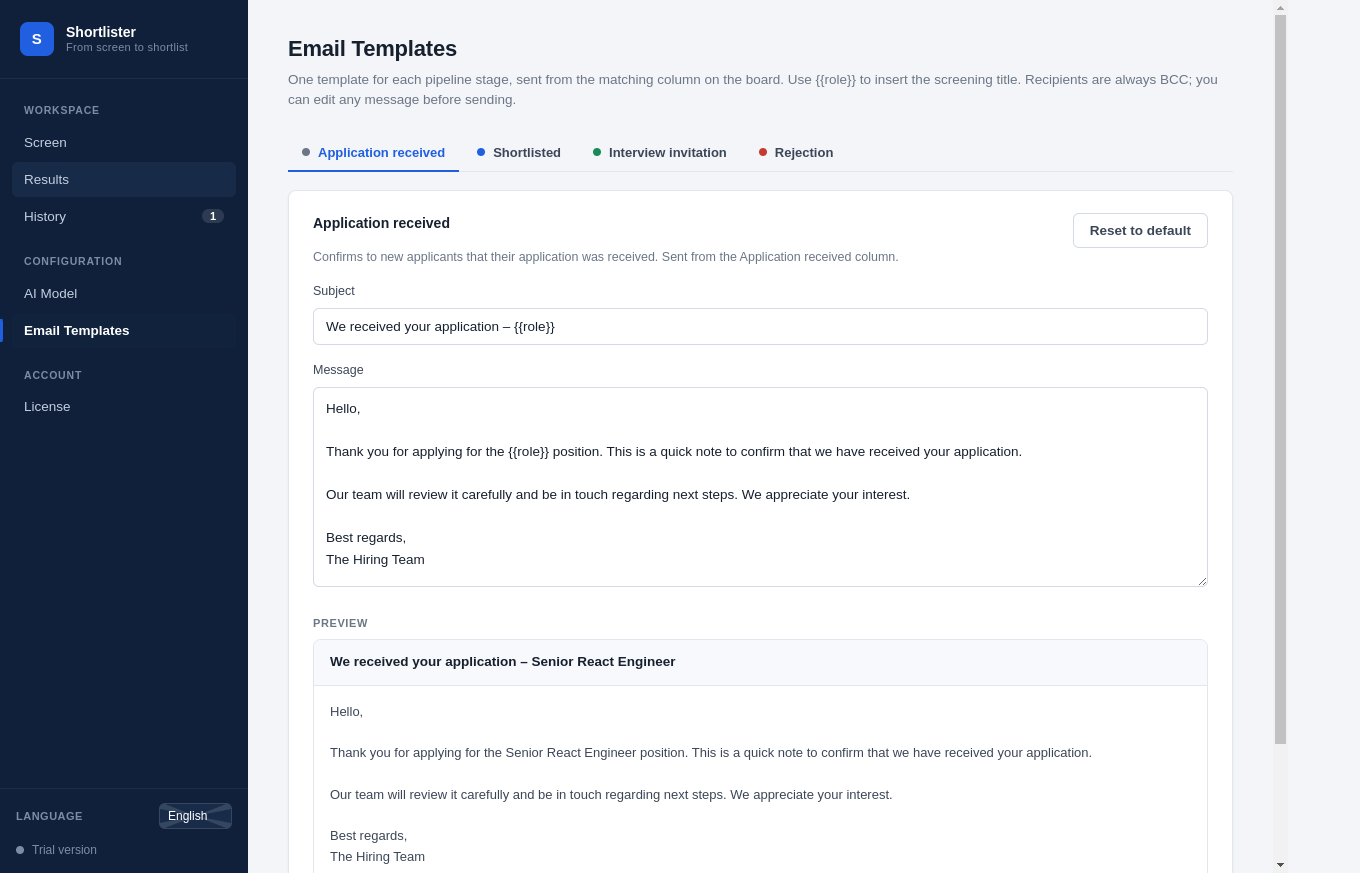
Email everyone in a stage from your own mail app (BCC), with tailored templates for shortlist, interview, and rejection.

6

Shareable HR reports

One-click report per screening — stats, shortlist, skill matrix, and AI flags — ready to copy into an email or save as PDF.
Privacy by design

Candidate data stays on your machine.

Point the app at a local model (Ollama, LM Studio, or vLLM) and screening runs entirely offline — resumes are never uploaded to us or any third party. Prefer cloud quality? Switch to Claude with your own API key. Either way, you're in control.

  • No servers, no accounts, no telemetry on candidate content
  • Local models keep PII on-device — GDPR-friendly
  • Your job descriptions and shortlists stay private
  • Works air-gapped, license included
Three steps

Up and running in minutes

STEP 1

Add the job & resumes

Paste the job description and select a folder of resumes (PDF, DOCX, or TXT).

STEP 2

Let AI score them

The app ranks every candidate against the role, with skill matches and AI-generation checks.

STEP 3

Shortlist & report

Move candidates through your pipeline, email your shortlist, and export a report for HR.

Screenshots

A closer look at the app

Clean, corporate, and built for how recruiters actually work.

Simple licensing

Download free. Unlock when you're ready.

Try the full app with no time limit. Buy a license key to remove the trial cap — instantly, offline.

Free trial
€0
The complete app, capped at 20 resumes per screening.
  • Every feature unlocked
  • Local & Claude models
  • Up to 20 resumes per run
  • No account, no time limit
Download for Windows
BEST VALUE
Lifetime license
€99 one-time
Unlimited screening — pay once, own it forever. No subscription.
  • Unlimited resumes per screening
  • Priority email support
  • Offline license key — no phone-home
  • Free updates included
Buy a license

Works like WinRAR: download and use the app for free — nothing expires. When you're ready, buy a license key and paste it into the app to unlock unlimited screening. The key is tied to your email and works fully offline, no re-activation needed.

Questions

Frequently asked

Is my candidate data sent anywhere?

No. With a local model (Ollama, LM Studio, vLLM) everything runs on your machine and nothing is uploaded. If you choose Claude, resume text is sent to Anthropic's API using your own key — your call.

What does the free trial include?

The complete app, with every feature unlocked. It scores up to 20 resumes per screening. There's no time limit and no account required — buy a license anytime to remove the cap.

How do licenses work?

After purchase you receive a license key tied to your email. Paste both into the app's License screen and it activates instantly — offline, with no server check.

What are the system requirements?

Windows 10 or 11, 64-bit. A local model needs a few GB of RAM; alternatively use Claude with an API key on any spec.

Which resume formats are supported?

PDF, Word (DOCX), and plain text (TXT). Scanned/image-only PDFs are flagged as unreadable.

Start screening smarter today

Download the app, run your first screening in minutes, and unlock the full version whenever you're ready.

Download for Windows Free · v0.1.0
Windows 10 / 11 · 64-bit · ~90 MB installer